
NHTSA ID Number: 10059897
Manufacturer Communication Number: 045
Summary
SUMMARY TO BE PROVIDED ON A FUTURE DATE.
1 Affected Product
Vehicle
| MAKE | MODEL | YEAR |
KIA | OPTIMA | 2013 |
2012-045
SUBJECT:
SERVICE ACTION: UVO SOFTWARE UPGRADE (SA136)
This bulletin provides the procedure for upgrading the 2013MY Optima UVO system. Kia is requesting the completion of this Service Action on all affected 2013MY Optima vehicles prior to delivery. Before conducting the procedure, verify that the vehicle is included in the list of the affected VINs.
*CAUTION
Delete all paired phones from the UVO syste m; delete UVO from all phones. If you do not delete phones, the phone(s) will still show and act as paired, but performance or functional issues may occur. Anytime a software update is performed to either a paired phone or the UVO system, the pairing should be deleted from both phone and UVO system and then pair again after update.
For UVO software update use only USB flash drives that do not contain any files or folders.
USB flash drive specs: FAT32, USB 2.0 and at least 1GB memory.
Battery should be fully charged during update, otherwise there could be data loss or damage to UVO system.
Updating UVO system may take 2 to 10 minutes.
(Time may vary depending on previous UVO software version.)
- If viewing this TSB electronically, click the link below.
Otherwise, log on to KGIS/KiaTechInfo.com and click on “Diagnostic Tools,” then click “Software Downloads” from the navigation menu.
2a. Click on “Download for 2013 UVO Software Update” link.
2b. Click on “2013 UVO Software Update Download” link.
- Click “Save File.”
4a. Save file onto computer by clicking “Save”.
4b. Navigate to saved location and double click on file to open it. The file name is UVO_9013.
- Click “Run.”
- Click “Run.”
- Insert a flash drive in to USB port on your computer; click “Unzip” and the files will be downloaded to the USB flash drive.
8a. Unzip the downloaded file to the root directory of the USB drive being used for the update.
*NOTICE
Unzipping the attached or downloaded file and copying the folder to the USB or unzipping to any folder other than the root folder will result in the upload not executing.
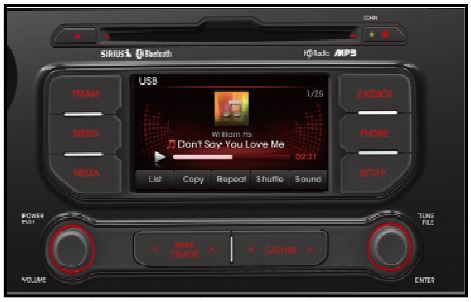
8b. Power UVO system ON.
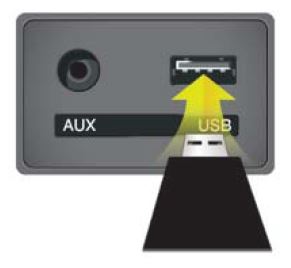
8c. Connect USB flash drive to UVO system’s USB socket
*NOTICE
The system will display “Reading Media” on the screen after USB is inserted. This is normal, since the unit is searching for music files. Then the system may display a “No File Available” pop-up after system music search is complete, wait until new screen appears and continue with the upgrade. Do not power off at any point while the system is being upgraded.
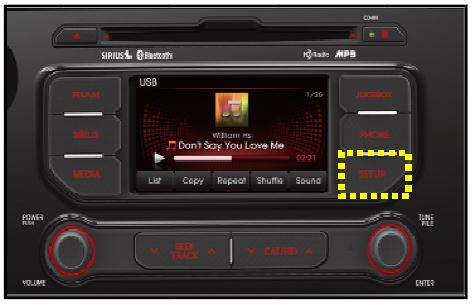
- Press “SETUP” button on the head unit.
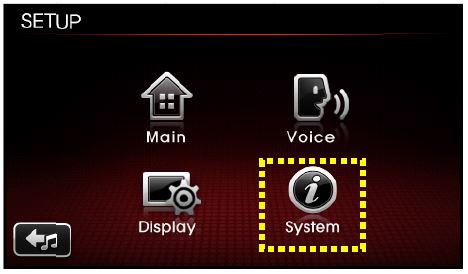
- Touch “System” icon on the Screen.
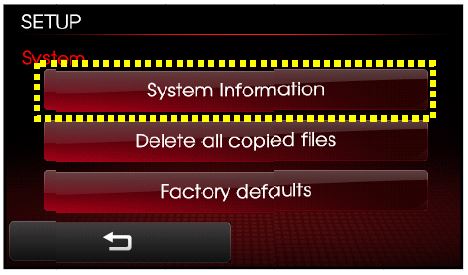
- Touch “System Information” button on the screen.
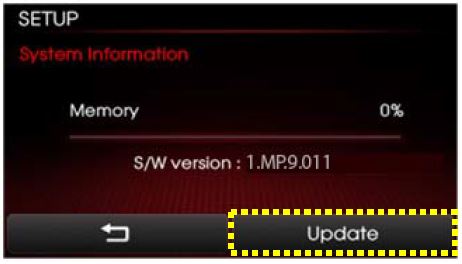
12a. Varify the current S/W version (1.MP.9.011) as shown in the image.
12b. Touch “Update” button on screen.
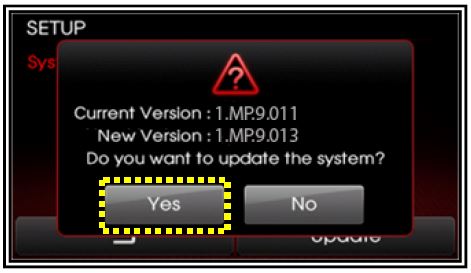
- Check that “New Version” is correct for this Service Action (New version is 1.MP.9.013); if version is correct, then touch “Yes” button screen.
- The UVO system will automatically reboot and the update will proceed.
*NOTICE
When rebooting, screen will go dark for approximately 20 to 40 seconds, this is normal. System will reboot 2 times to perform the update.
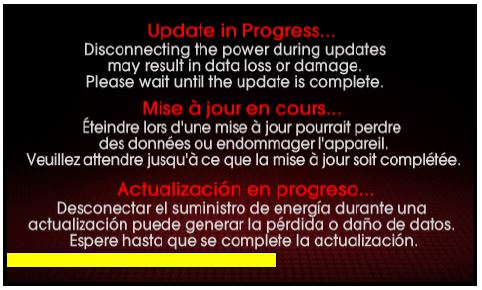
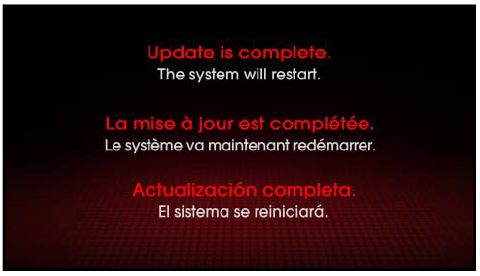
- After the update is complete, the display shown on the right will appear for a few moment; then the UVO system will reboot again.
Repeat steps 2~4 and verify whether UVO system version has been updated to version 1.MP.9.013.
- Verify proper system function by obtaining the customer’s phone(s) and pairing it(them) with the system.
AFFECTED VEHICLE PRODUCTION RANGE:
| Model | Production Date Range |
|---|---|
| Optima (QF) | June 1st, 2012 to October 23rd, 2012 |
1 Associated Document
Service Bulletin Document
SB-10059897-2280.pdf 2658.077KB

- USB-C 2-in-1 storage OTG: The Lexar JumpDrive Dual Drive D40E features USB Type-A and Type-C connectors in a slim, portable form factor for easy device compatibility
- Transfer speeds up to 100MB/s: Based on internal testing, performance may vary depending upon the host device, interface, and usage conditions. 1MB=1,000,000 bytes
- Plug and Play: Widely compatible with USB Type-C smartphones, tablets, laptops, Macs, and traditional Type-A devices, no software installation required. The 360° swivel design allows for easy switching between connectors without the hassle of losing a cap
- Durable & Compact: The Lexar D40E USB memory stick features a metal enclosure, withstands temperatures from 0° to 50° C (32°F to 122°F), and is lightweight at 26g with dimensions of 70.4 x 16.9 x 11.7mm
- Security & Warranty: Securely protects files using an advanced security software solution with 256-bit AES encryption. Backed by a Lexar 3-year limited warranty

- What You Get - 2 pack 64GB genuine USB 2.0 flash drives, 12-month warranty and lifetime friendly customer service
- Great for All Ages and Purposes – the thumb drives are suitable for storing digital data for school, business or daily usage. Apply to data storage of music, photos, movies and other files
- Easy to Use - Plug and play USB memory stick, no need to install any software. Support Windows 7 / 8 / 10 / Vista / XP / Unix / 2000 / ME / NT Linux and Mac OS, compatible with USB 2.0 and 1.1 ports
- Convenient Design - 360°metal swivel cap with matt surface and ring designed zip drive can protect USB connector, avoid to leave your fingerprint and easily attach to your key chain to avoid from losing and for easy carrying
- Brand Yourself - Brand the flash drive with your company's name and provide company's overview, policies, etc. to the newly joined employees or your customers

- High-speed USB 3.0 performance of up to 150MB/s(1) [(1) Write to drive up to 15x faster than standard USB 2.0 drives (4MB/s); varies by drive capacity. Up to 150MB/s read speed. USB 3.0 port required. Based on internal testing; performance may be lower depending on host device, usage conditions, and other factors; 1MB=1,000,000 bytes]
- Transfer a full-length movie in less than 30 seconds(2) [(2) Based on 1.2GB MPEG-4 video transfer with USB 3.0 host device. Results may vary based on host device, file attributes and other factors]
- Transfer to drive up to 15 times faster than standard USB 2.0 drives(1)
- Sleek, durable metal casing
- Easy-to-use password protection for your private files(3) [(3)Password protection uses 128-bit AES encryption and is supported by Windows 7, Windows 8, Windows 10, and Mac OS X v10.9 plus; Software download required for Mac, visit the SanDisk SecureAccess support page]


- GOOD VALUE PACKAGE - 1 Pack 32GB Memory Stick USB 2.0 Flash Drives with great cost performance and high quality.
- BIG CAPACITY - The available capacity: 29.10GB-29.8GB, You can save the data of movies, music, photos, designs, programs, manuals, handouts in a high speed.Good performance in digital data storing, transferring and sharing with families, friends, workmates, clients and machines.
- EASY TO USE & PLUG AND WORK - Support windows 7 / 8 / 10 / Vista / XP / 2000 / ME / NT Linux and Mac OS, Compatible with USB2.0 and below.
- TWISTTURN DESIGN & EASY CARRY - The metal clip rotates 360° round the ABS plastic body which with rubber oil skin feeling finish. The capless design can avoid lossing of cap, and providing efficient protection to the USB port.
- WARRANTY & SUPPORT - SIMMAX logo is laser printed on the USB connector surface, our products are of good quality and we promise that any problem about the product within one year since you buy.

- Lightweight and convenient: Lexar JumpDrive A30E (USB Type-A) boasts a slim, portable design for easy device compatibility; lightweight at 7.41 g
- Transfer speeds up to 100 MB/s: 10x faster than standard USB 2.0 drives; Based on internal testing, performance may vary depending upon the host device, interface, and usage conditions
- Wide compatibility: Compatible with tablets, laptops, Macs, and traditional Type-A devices, no software installation required; Reliably stores photos, videos & files
- Compact: Features a push-button retractor and a lanyard loop for on-the-go use
- Enhanced security: Lexar DataShield protects files, easily creates a password-protected safe with auto-encryption; Files deleted from the safe are securely erased and can't be recovered
This product presentation was made with AAWP plugin.