SUBJECT:
IMPROPER MAP DATA ERROR WHEN INSTALLING SD CARD
This Pitstop provides information regarding a potential error message which may be received on some 2014MY Sorentos (XM). The Sorento equipped with navigation now uses an SD card to store map data and this card must be removed from the glove box and installed during PDI.
On some vehicles, when the SD card is installed and the navigation system allowed to reboot normally, you may receive an error message indicating:
“This is not the proper map data. Please check and try again.”
If you receive this error message, please open a Techline case for further assistance addressing this concern.
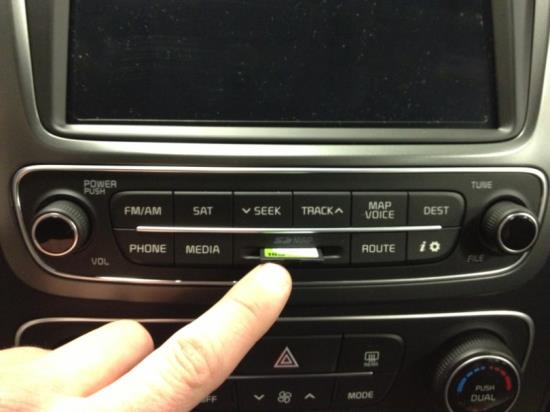
CAUTION
Please take caution when inserting the SD card to prevent damage to the audio face-plate.
No products found.
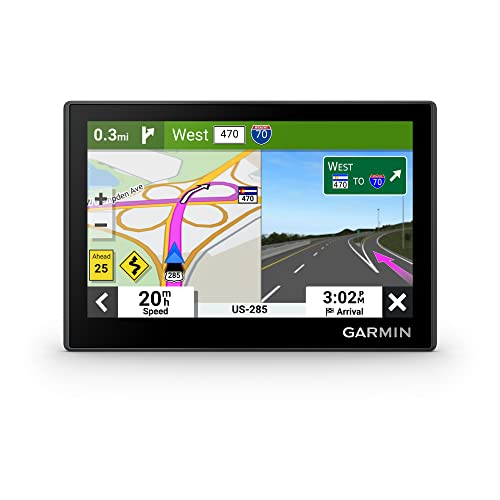
- Bright, high-resolution 5” glass capacitive touchscreen display lets you easily view your route
- Get more situational awareness with alerts for school zones, speed changes, sharp curves and more
- View food, fuel and rest areas along your active route, and see upcoming cities and milestones
- View Tripadvisor traveler ratings for top-rated restaurants, hotels and attractions to help you make the most of road trips
- Directory of U.S. national parks simplifies navigation to entrances, visitor centers and landmarks within the parks

- Vehicle dash mount for use on any stable surface
- Securely holds your GPS in vehicle.Keep your device in easy sight with this portable friction mount, and then remove it from your vehicle when you arrive at your destination
- Does not slide or detach while vehicle is in motion
- Adjustable to position GPS in a variety of angles
- Ships in Certified Frustration-Free Packaging

This product presentation was made with AAWP plugin.