SUBJECT:
MAP DEFAULTS AND ROUTING TERMINOLOGY
When addressing customer concerns relating to navigation system map defaults and routing terminology, you may refer to the information below to better understand the differences between different model year navigation systems. As an example, the map defaults for routing on new vehicles (or vehicles which have received a map update) can vary depending on the head unit generation. 2014MY Sorento and Forte vehicles were the first Kia models to feature Generation 3.0 Navigation units. Prior to the 2014MY, the navigation units are classified as Generation 1.5 or Generation 2.0.
Map defaults for Generation 1.5, 2.0 and 3.0
Generation 1.5 (Sedona, pre-2014MY Sorento and Forte): Default routing is “Recommended”
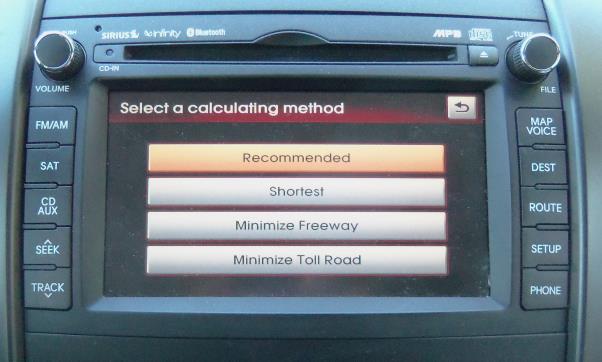
Generation 2.0 (Optima, Optima Hybrid, Sportage, Soul, Rio) Default routing is “Recommended”. “Use Ferries” defaults to “ON”.
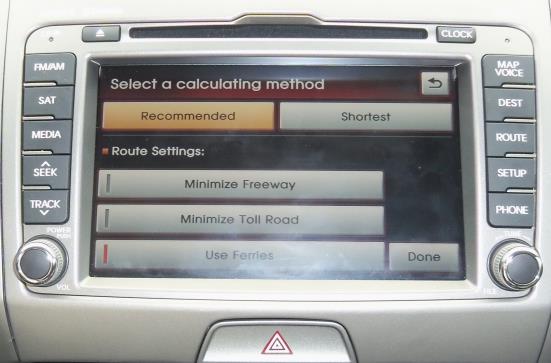
“Recommended” tends to route based on distance and traffic conditions (customer may not be routed on the shortest distance on smaller, slower speed limit streets – may route more on major thoroughfares)
“Shortest” tends to route based on the shortest distance from the start point to the destination, reducing the distance travelled, however, not necessarily the time travelled when compared to “Recommended”.
“Minimize Freeway” routes with minimal use of highways.
“Minimize Toll Road” routes with minimal use of toll roads.
“Use Ferries” routes to include the use of ferries.
Generation 3.0 (2014MY Sorento, Forte and Cadenza) Default routing is “Faster Time” “Use Ferries” defaults to “OFF”.
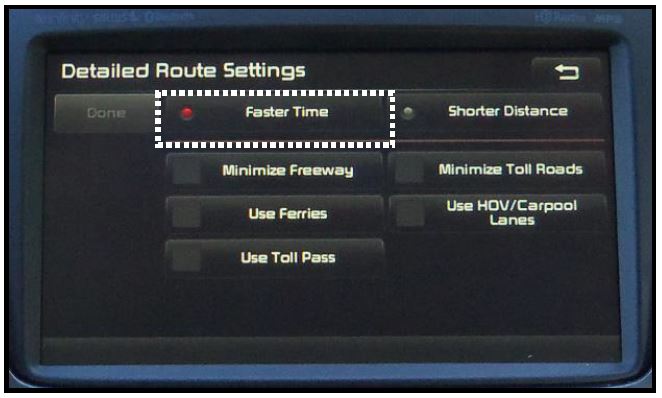
Added and modified options on the Generation 3.0 Navigation:
“Faster Time” routes reflect distance and traffic conditions (replaces “Recommended”).
“Use HOV/Carpool Lanes” routes to include High Occupancy Vehicle/Carpool Lanes.
“Use Toll Pass” routes to include the use of Toll Pass Roads (Easy Pass, Fastrack, etc.)
For information regarding the changes a customer might notice when a map upgrade is installed, see PS253.
No products found.
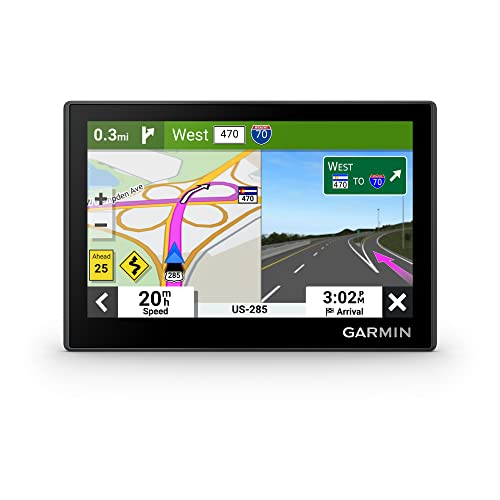
- Bright, high-resolution 5” glass capacitive touchscreen display lets you easily view your route
- Get more situational awareness with alerts for school zones, speed changes, sharp curves and more
- View food, fuel and rest areas along your active route, and see upcoming cities and milestones
- View Tripadvisor traveler ratings for top-rated restaurants, hotels and attractions to help you make the most of road trips
- Directory of U.S. national parks simplifies navigation to entrances, visitor centers and landmarks within the parks

- Vehicle dash mount for use on any stable surface
- Securely holds your GPS in vehicle.Keep your device in easy sight with this portable friction mount, and then remove it from your vehicle when you arrive at your destination
- Does not slide or detach while vehicle is in motion
- Adjustable to position GPS in a variety of angles
- Ships in Certified Frustration-Free Packaging

This product presentation was made with AAWP plugin.